Using Blosc2 with pandas
There are two ways to make a pandas computation faster with Blosc2, and which one you want depends on a single question: does your function work on one column at a time, or does it combine several columns per row?
your function |
use |
typical win |
|---|---|---|
transforms one column ( |
|
2-3x |
combines columns, one result per row |
|
5-7x |
Both need a decent amount of data and a decent amount of arithmetic to be worth it; the sections below say how much.
One column at a time: engine=blosc2.jit
DataFrame.apply and Series.map accept an engine= argument, and
blosc2.jit is one such engine. pandas hands your function the whole column
at once, and Blosc2 evaluates the entire function body in a single
multi-threaded pass.
Yeo-Johnson — the power transform behind scikit-learn’s PowerTransformer —
is a good fit: its parameter is fitted per column, so you apply it to every
column of a feature matrix.
import numpy as np
import pandas as pd

import blosc2

rng = np.random.default_rng(0)
df = pd.DataFrame({f"c{i}": rng.normal(size=1_000_000) for i in range(8)})


@blosc2.jit
def yeo_johnson(col, lam=0.5):
    # np.where evaluates both arms, so clamp each to its own domain
    pos = (np.power(np.maximum(col, 0.0) + 1.0, lam) - 1.0) / lam
    neg = -(np.power(np.maximum(-col, 0.0) + 1.0, 2.0 - lam) - 1.0) / (2.0 - lam)
    return np.where(col >= 0, pos, neg)


result = df.apply(yeo_johnson, engine=blosc2.jit)
You get back the same DataFrame plain df.apply(yeo_johnson) would return,
computed differently: 0.058 s instead of 0.121 s, a 2.1x speedup.
The win comes from not materialising intermediates. NumPy runs that body one operation at a time, allocating a full-size temporary array at each step. Blosc2 captures the whole expression first, then makes one pass over the data, computing every step on a small piece while it is still in cache and spreading the pieces across cores.
When it pays off
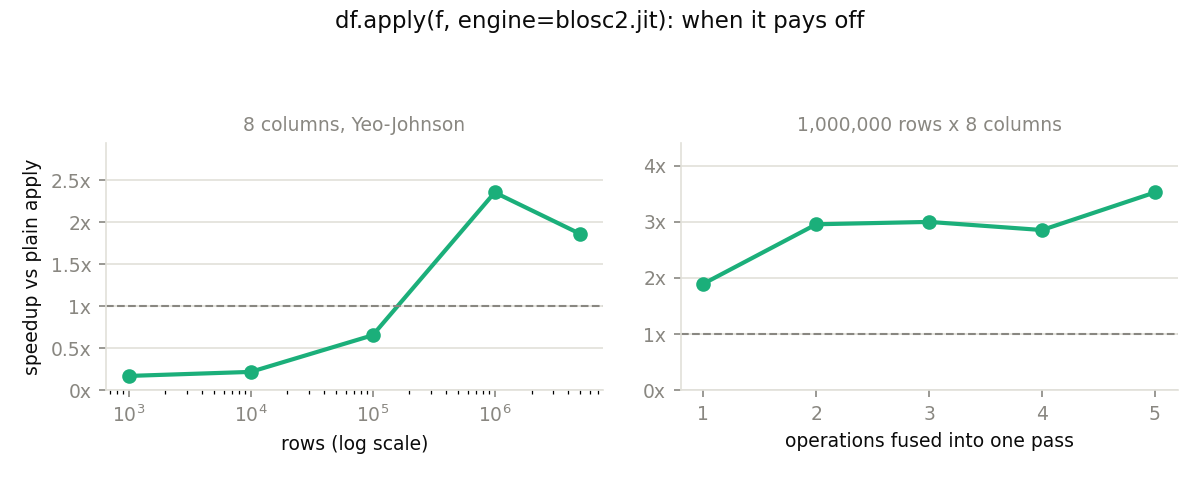
Enough rows (left): setup costs a fixed amount per call, so break-even
falls between 100,000 and 1,000,000 rows. Below that, use a plain apply.
Beyond a few million the win eases off — the data no longer fits in cache and
memory bandwidth becomes the limit.
Enough arithmetic (right): the more operations there are to fuse, the more
temporaries are skipped — 1.9x for a single operation, 3.5x for five. One
cheap operation over a big array wins nothing at all
(df.apply(lambda col: col + 1, engine=blosc2.jit) runs at half the speed
of a plain apply). Reach for the engine when the function does real work per
element.
pd.eval(..., engine="numexpr") fuses expressions the same way and is
somewhat faster here; the reason to prefer engine=blosc2.jit is that you
write a Python function instead of a quoted expression string. See
Details.
Several columns per row: skip apply, pass the columns
This is the case pandas 3 highlights engine= for, and it is where apply is
the wrong shape: its contract is one call per row. A @blosc2.jit function
takes one parameter per column and is called directly — and since a DataFrame
unpacks into one keyword argument per column, that call is just f(**df).
Kepler’s equation, solved per row by Newton-Raphson:
rng = np.random.default_rng(0)
orbits = pd.DataFrame(
    {
        "mean_anomaly": rng.uniform(0, 2 * np.pi, 1_000_000),
        "eccentricity": rng.uniform(0.0, 0.95, 1_000_000),
    }
)


@blosc2.jit
def kepler(mean_anomaly, eccentricity):
    e = mean_anomaly + eccentricity * sin(mean_anomaly)
    for _ in range(100):
        diff = (e - eccentricity * sin(e) - mean_anomaly) / (
            1.0 - eccentricity * cos(e)
        )
        e = e - diff
        if abs(diff) < 1e-12:
            break
    return e


orbits["E"] = kepler(**orbits)
No apply, no engine=. The parameter names match the column names, so **
does the wiring — by name, so the column order in the frame is irrelevant.
Each column arrives as a pandas Series, which the kernel accepts like any
array (zero-copy for ordinary numeric dtypes). **df passes
every column, so subset first if the frame has more:
kepler(**orbits[["mean_anomaly", "eccentricity"]]).
On 1,000,000 rows that runs in 0.027 s against 0.165 s for fully vectorized
NumPy — 6.2x — and about 164x faster per row than a plain
df.apply(..., axis=1).
Why it beats even vectorized NumPy
Vectorized NumPy has to keep looping until the worst row converges: the loop
is at the whole-array level, so every row pays for the slowest one. The
kernel’s for/if/break compile to a real per-element loop, so each row
stops as soon as it converges — and the whole thing still runs as one fused,
multi-threaded pass.
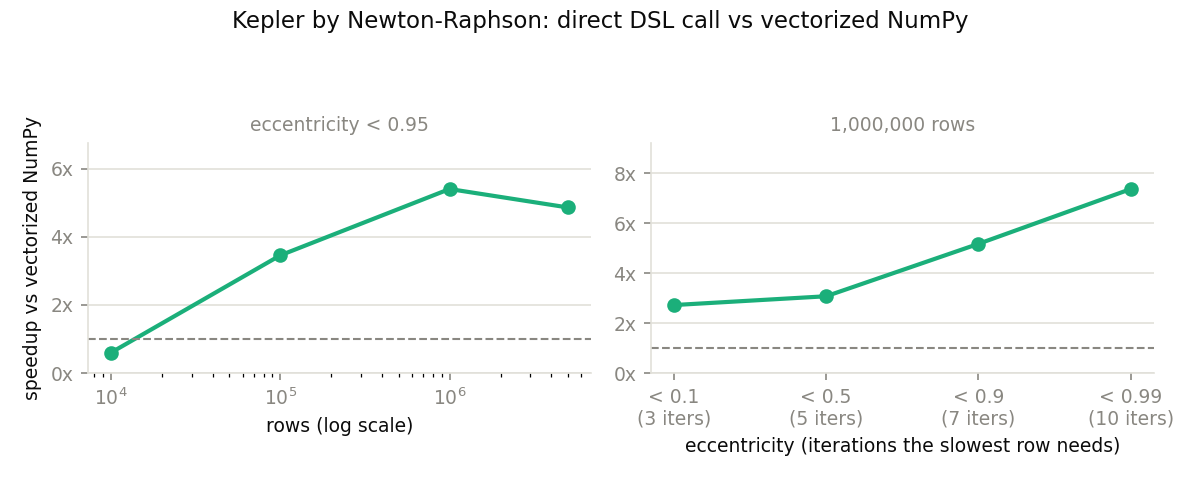
That explanation predicts the right-hand panel, which varies orbital
eccentricity — i.e. how much harder the worst row is than a typical one. With
near-circular orbits every row converges in the same 3 iterations, there is
nothing for break to skip, and the win falls to 2.7x. With near-parabolic
ones the slowest row needs 10 iterations while the average needs 4, and the
win climbs to 7.4x. The more uneven the work per row, the more this
pattern wins. The left panel is the familiar row-count story: break-even
around 20,000 rows, 3.5x at 100,000.
Note that the kernel never learns it was handed a DataFrame. The same call
works with polars, xarray, h5py — or a blosc2.NDArray, which is how you
reach compressed, larger-than-memory operands. Only the **df spelling is
pandas-specific.
If your function has no per-row loop
df.apply(f, engine=blosc2.jit, axis=1) does work for functions that merely
combine columns by name (row["a"] + row["b"]): they are dispatched to a
single whole-column call rather than a per-row Python loop. Add a for or
while to that idiom and it raises a TypeError pointing back here — that
shape can only be compiled, not traced.
An if, on the other hand, is fine. row["colname"] references are rewritten
into named parameters, so the function is compiled as a DSL kernel and every
branch runs:
def format_room_info(row):
    result = "property_type=" + row["property_type"]
    desc = row["name"].lower()
    if " with " not in desc:
        return result + ", room_type=" + desc.removesuffix(" room")
    before, after = desc.split(" with ", 1)
    r2 = result + ", room_type=" + before.removesuffix(" room")
    return r2 + ", amenity=" + after


df.apply(format_room_info, axis=1, engine=blosc2.jit)
String columns work here, and so do .lower(), .removesuffix() and
str.split(sep, 1) with tuple unpacking — they are lowered to the DSL’s
function-call grammar for you. Two things to know:
A string local’s width is fixed by its first assignment, so reassigning it to a longer value is a compile error. Use a fresh name per step, as
r2does above.Nulls in a string column are rejected, because a row-wise kernel over a null raises in pandas too (
"p=" + row["x"]is aTypeError). Fill them first if you want a value.
Gotchas
Your function normally runs only once. The engine calls it a single time
with stand-in objects that record operations rather than compute them, then
evaluates the recorded expression over the real data (this is tracing). So a
plain if on column values has nothing to look at and raises ValueError: The truth value of an array ... is ambiguous. Use np.where, or write the
function so it compiles instead — see below.
Real if/for/while works, if the function fits the DSL. When your
function branches or loops over column values and fits Blosc2’s
DSL grammar, it is compiled and runs as written,
branches and all — that is what makes the Kepler kernel above possible. If it
doesn’t fit the grammar, it silently falls back to tracing (hence the
ValueError); if it looks DSL-shaped but calls an unsupported function, you
get a RuntimeError naming it.
np.where evaluates both arms. Both branches are computed over the whole
column before one is selected, so each runs on values it was never meant to
see — negative bases, divisions by zero, RuntimeWarnings. The answer is
still correct, but clamp each arm to its own domain (as yeo_johnson does
with np.maximum) to keep the noise and wasted work away.
Don’t put a reduction inside per-element control flow. In a DSL kernel,
sum/max/min collapse the whole block being evaluated to a single value,
not one per row. So if max(abs(diff)) < 1e-12: break compiles, runs, and
silently gives wrong results for every row but the first. Write the
per-element form: if abs(diff) < 1e-12: break.
std() changes meaning. A plain apply passes a pandas Series
(ddof=1); the engine passes a NumPy array (ddof=0). Pass ddof explicitly
if it matters.
Limitations
Numeric, boolean and fixed-width string (
str,bytes) columns; anything else raisesValueError. Variable-widthutf8()columns are not supported yet.na_action="ignore"is not supported formap(NotImplementedError): there is no per-element step at which to skip a value.Only
DataFrame.applyandSeries.mapreach the engine. pandas 3’sSeries.applydoesn’t acceptengine=for non-string functions, andDataFrame.mapdoesn’t forward it — both are pandas-side limits.engine=always gets auto-detection: pandas’ protocol requires the plainblosc2.jitobject, sostrict=True/strict=Falsecannot be passed through it (a direct call can).
Details
Two things worth knowing once you are actually using this, neither needed to get started.
Against numexpr. pandas’ own
Enhancing performance
guide describes pd.eval(..., engine="numexpr"), which fuses expressions on
the same principle. On the Yeo-Johnson example:
approach |
time |
vs plain apply |
|---|---|---|
plain |
0.121 s |
1.00x |
|
0.058 s |
2.07x |
|
0.039 s |
3.09x |
numexpr is faster on an in-memory frame, so the trade is not raw speed: its
version of yeo_johnson has to collapse into one quoted string,
"where(c >= 0, ((maximum(c, 0.0) + 1.0) ** lam - 1.0) / lam, ...)", while
the Blosc2 version stays a Python function — intermediate variables, a name,
helper calls, unit tests, and your linter. Note also that neither
engine=blosc2.jit nor numexpr touches compressed data here: pandas
materialises each column as a plain NumPy array first. Only the direct-call
pattern reaches blosc2.NDArray operands.
What column extraction costs. df["col"] is a zero-copy view for ordinary
numeric dtypes, including in mixed-dtype frames: pulling out one column never
triggers the whole-frame upcast that df.to_numpy() does (which is what
engine=blosc2.jit uses internally for axis=0), and each column keeps its
own dtype. Nullable (Float64/Int64), Arrow-backed and tz-aware columns are
the exception — they allocate a converted array once, which is noise next to
iterative work like the Kepler kernel.
Reproducing these numbers
All figures on this page come from bench/bench_pandas_engine.py, measured on
an Apple M4 with pandas 3.0.3 and 8 threads:
python bench/bench_pandas_engine.py
It prints every table on this page and regenerates both plots.