Working with Containers
This notebook is a guided tour of the main data containers in python-blosc2.
The goal is to build a practical mental model first: what each container is, how the containers relate, and when each one is the right tool.
[1]:
import shutil
import tempfile
from contextlib import suppress
from pathlib import Path

import numpy as np

import blosc2

np.set_printoptions(edgeitems=4, linewidth=100)

WORKDIR = Path(tempfile.mkdtemp(prefix="blosc2-containers-"))


def show(label, value):
    print(f"{label}: {value}")


def path(name):
    return str(WORKDIR / name)


def reset(name):
    with suppress(Exception):
        blosc2.remove_urlpath(path(name))
    return path(name)
The Big Picture
SChunk is the storage foundation. Higher-level containers either wrap it to provide a more convenient programming model, or use it as a building block inside larger stores.
NDArrayadds N-dimensional array semantics on top of chunked compressed storage.ListArraystores one variable-length typed list per row.ObjectArraystores one variable-length serialized item per entry.BatchArraystores batches of variable-length items.CTablestores tabular data in columnar form; columns are oftenNDArrayobjects, but can also be other containers such asBatchArray,ObjectArray, orListArray.EmbedStore,DictStore, andTreeStoreorganize multiple containers together.C2Arrayis different: it is a remote array handle rather than a local storage container.
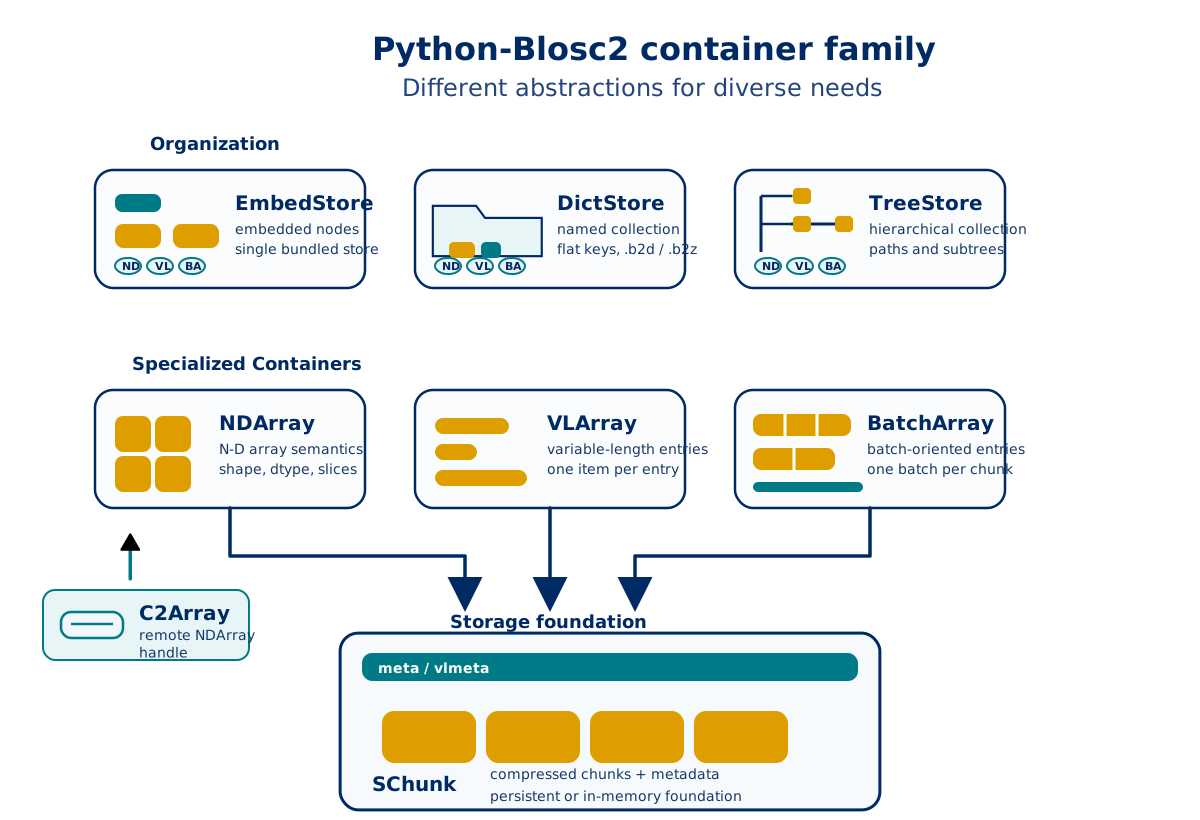
For more info on each of these containers, keep reading.
SChunk: The Foundation
SChunk is the low-level compressed storage container in Blosc2. Conceptually, it is a sequence of compressed chunks plus metadata.
Use it when you want direct control over chunk-oriented storage, chunk append/update operations, or persistent compressed payloads without array semantics.
[2]:
data = np.arange(12, dtype=np.int32)
schunk = blosc2.SChunk(
    chunksize=4 * data.dtype.itemsize,
    data=data,
    cparams=blosc2.CParams(typesize=data.dtype.itemsize),
)

out = np.empty(5, dtype=np.int32)
schunk.get_slice(start=2, stop=7, out=out)
chunk_info = list(schunk.iterchunks_info())

show("nchunks", schunk.nchunks)
show("nbytes", schunk.nbytes)
show("slice [2:7]", out)
show("chunk ratios", [round(float(info.cratio), 3) for info in chunk_info])
show("special flags", [info.special.name for info in chunk_info])
nchunks: 3
nbytes: 48
slice [2:7]: [2 3 4 5 6]
chunk ratios: [0.333, 0.333, 0.333]
special flags: ['NOT_SPECIAL', 'NOT_SPECIAL', 'NOT_SPECIAL']
NDArray: Compressed N-D Arrays
NDArray is the main dense-array container in python-blosc2. It adds array semantics such as shape, dtype, slicing, chunking, and persistence on top of an underlying SChunk.
Use it for dense numeric data when you want array operations together with compressed storage.
[3]:
arr_path = reset("demo_array.b2nd")
a = blosc2.asarray(
    np.arange(12).reshape(3, 4),
    urlpath=arr_path,
    mode="w",
    chunks=(2, 2),
    blocks=(1, 2),
)
reopened = blosc2.open(arr_path, mode="r")

show("shape", a.shape)
show("chunks", a.chunks)
show("blocks", a.blocks)
show("slice [:, 1:3]", a[:, 1:3])
show("reopened type", type(reopened).__name__)
shape: (3, 4)
chunks: (2, 2)
blocks: (1, 2)
slice [:, 1:3]: [[ 1  2]
 [ 5  6]
 [ 9 10]]
reopened type: NDArray
ListArray: Typed Variable-Length Lists
ListArray is a compact container for one variable-length typed list per row. It is useful when every row contains a list of items with the same logical item type, but the list length changes from row to row.
Use it for ragged typed data such as token ids, tags, nested numeric observations, or nullable lists. Compared with ObjectArray, it keeps more type information and can interoperate with Arrow-style list arrays.
[4]:
list_path = reset("tags.b2b")
tags = blosc2.ListArray(
    item_spec=blosc2.string(max_length=16),
    nullable=True,
    storage="batch",
    batch_rows=2,
    urlpath=list_path,
    mode="w",
)
tags.extend([["red", "fast"], [], None, ["blue"]])
tags.flush()
reopened = blosc2.open(list_path, mode="r")

show("length", len(tags))
show("all rows", tags[:])
show("row 0", tags[0])
show("reopened type", type(reopened).__name__)
show("reopened rows", reopened[:])
length: 4
all rows: [['red', 'fast'], [], None, ['blue']]
row 0: ['red', 'fast']
reopened type: ListArray
reopened rows: [['red', 'fast'], [], None, ['blue']]
ObjectArray: Variable-Length Items
ObjectArray is a list-like container for variable-length Python values. Each entry is serialized and stored as its own compressed chunk in a backing SChunk.
Use it for ragged or heterogeneous values such as strings, dictionaries, tuples, lists, and byte payloads.
[5]:
vl_path = reset("notes.b2frame")
vla = blosc2.ObjectArray(urlpath=vl_path, mode="w", contiguous=True)
vla.extend(
    [
        {"kind": "alpha", "count": 1},
        ["x", "y"],
        b"abc",
    ]
)
reopened = blosc2.open(vl_path, mode="r")

show("entries", list(vla))
show("entry types", [type(v).__name__ for v in vla])
show("reopened type", type(reopened).__name__)
show("reopened[1]", reopened[1])
entries: [{'kind': 'alpha', 'count': 1}, ['x', 'y'], b'abc']
entry types: ['dict', 'list', 'bytes']
reopened type: ObjectArray
reopened[1]: ['x', 'y']
BatchArray: Batched Variable-Length Data
BatchArray is designed for batch-oriented variable-length data. Instead of storing one item per chunk, it stores one batch per chunk, with optional internal subdivision for more efficient item access inside a batch.
Use it when data arrives or is processed in batches and batch-level append/update operations are the natural API.
[6]:
batch_path = reset("batches.b2b")
store = blosc2.BatchArray(urlpath=batch_path, mode="w", contiguous=True, items_per_block=2)
store.append([{"x": 1}, {"x": 2}, {"x": 3}])
store.append([{"x": 4}, {"x": 5}])
reopened = blosc2.open(batch_path, mode="r")

show("batches", len(store))
show("first batch", list(store[0]))
show("first four items", list(store.iter_items())[:4])
show("reopened type", type(reopened).__name__)
batches: 2
first batch: [{'x': 1}, {'x': 2}, {'x': 3}]
first four items: [{'x': 1}, {'x': 2}, {'x': 3}, {'x': 4}]
reopened type: BatchArray
CTable: Columnar Tables
CTable is the tabular container in python-blosc2. It stores data by column, so each field can be compressed and accessed independently.
Columns are commonly backed by NDArray objects for fixed-size numeric data, but a CTable is not limited to plain arrays. Depending on the schema, columns can also use other Blosc2 containers such as BatchArray, ObjectArray, or ListArray for variable-length or nested data.
Use it when your data is naturally row/column structured and you want columnar compression, column selection, filtering, persistence, and compatibility with the other Blosc2 stores.
[7]:
from dataclasses import dataclass


@dataclass
class TripSummary:
    trip_id: int = blosc2.field(blosc2.int64())
    distance_km: float = blosc2.field(blosc2.float64())
    company: str = blosc2.field(blosc2.string(max_length=32))
    tags: list[str] = blosc2.field(blosc2.list(blosc2.string(max_length=16), nullable=True))  # noqa: RUF009


ctable_path = reset("trips.b2z")
trips = blosc2.CTable(TripSummary, urlpath=ctable_path, mode="w")
trips.extend(
    [
        (1, 2.5, "Blue Cab", ["airport", "card"]),
        (2, 0.8, "Green Cab", []),
        (3, 12.1, "Yellow Cab", None),
    ]
)

show("columns", trips.col_names)
show("rows", len(trips))
show("distance storage", dict(trips["distance_km"].info_items)["storage"])
show("tags storage", dict(trips["tags"].info_items)["storage"])
print("data:")
print(trips)

trips.close()
reopened = blosc2.open(ctable_path, mode="r")
show("reopened type", type(reopened).__name__)
columns: ['trip_id', 'distance_km', 'company', 'tags']
rows: 3
distance storage: ndarray
tags storage: list
data:
   trip_id  distance_km     company                 tags
0        1     2.500000    Blue Cab  ['airport', 'card']
1        2     0.800000   Green Cab                   []
2        3    12.100000  Yellow Cab                 None

[3 rows x 4 columns]
reopened type: CTable
EmbedStore: Bundle Several Containers Into One Store
EmbedStore is a dictionary-like container that stores several Blosc2 objects as embedded nodes inside one backing store.
Use it when you want to package several arrays or container objects into one portable object or file.
[8]:
embed_path = reset("bundle.b2e")
estore = blosc2.EmbedStore(urlpath=embed_path, mode="w")
estore["/arr"] = np.arange(5)
estore["/ones"] = blosc2.ones(3, dtype=np.int16)

show("keys", sorted(estore.keys()))
show("type(/arr)", type(estore["/arr"]).__name__)
show("/arr", estore["/arr"][:])
show("type(/ones)", type(estore["/ones"]).__name__)
keys: ['/arr', '/ones']
type(/arr): NDArray
/arr: [0 1 2 3 4]
type(/ones): NDArray
DictStore: Key-Value Collection Of Containers
DictStore is a directory- or zip-backed key-value collection for Blosc2 objects.
Use it when you want to organize a dataset made of several named arrays or containers while keeping storage portable.
[9]:
dict_path = reset("dataset.b2z")
with blosc2.DictStore(dict_path, mode="w") as dstore:
    dstore["/raw"] = np.arange(4)
    dstore["/group/grid"] = blosc2.asarray(np.arange(6).reshape(2, 3))
    show("written keys", sorted(dstore.keys()))

with blosc2.DictStore(dict_path, mode="r") as dstore:
    show("reopened type", type(dstore).__name__)
    show("keys", sorted(dstore.keys()))
    show("/group/grid", dstore["/group/grid"][:])
written keys: ['/group/grid', '/raw']
reopened type: DictStore
keys: ['/group/grid', '/raw']
/group/grid: [[0 1 2]
 [3 4 5]]
TreeStore: Hierarchical Datasets
TreeStore extends DictStore with stricter hierarchical semantics and subtree navigation.
Use it when your dataset is naturally tree-structured and you want path-based organization plus subtree-level operations.
[10]:
tree_path = reset("tree.b2z")
with blosc2.TreeStore(tree_path, mode="w") as tstore:
    tstore["/exp/run1/data"] = np.arange(3)
    tstore["/exp/run2/data"] = np.arange(3, 6)
    subtree = tstore.get_subtree("/exp")
    show("subtree keys", sorted(subtree.keys()))
    show("walk(/)", list(subtree.walk("/")))

with blosc2.TreeStore(tree_path, mode="r") as tstore:
    show("reopened type", type(tstore).__name__)
    show("/exp/run2/data", tstore["/exp/run2/data"][:])
subtree keys: ['/run1', '/run1/data', '/run2', '/run2/data']
walk(/): [('/', ['run1', 'run2'], []), ('/run1', [], ['data']), ('/run2', [], ['data'])]
reopened type: TreeStore
/exp/run2/data: [3 4 5]
Storing CTables inside a TreeStore
A TreeStore can hold both NDArrays and CTables in the same bundle. A CTable is stored inline as a named subtree — all its columns, metadata, and index sidecars live as ordinary Blosc2 leaves inside the outer store. From the outside it appears as a single key, exactly like any other leaf:
ts["/table"] = ctable— stores the CTable inline (same syntax as NDArray).ts["/table"]— returns aCTableobject transparently."/table/_meta" not in ts— internal keys are hidden from normal traversal.del ts["/table"]— removes the whole object and all its leaves at once.
The inline layout means there are no nested ZIP files: all leaves are flat members of the outer .b2z archive and can be opened by offset without extraction.
[11]:
from dataclasses import dataclass


@dataclass
class Reading:
    sensor_id: int = 0
    value: float = 0.0


bundle_path = reset("bundle.b2z")

# --- Write: mix NDArrays and CTables in one bundle ----------------------
t = blosc2.CTable(Reading)
for i in range(6):
    t.append(Reading(sensor_id=i, value=round(i * 1.1, 2)))

with blosc2.TreeStore(bundle_path, mode="w") as ts:
    ts["/raw/signal"] = np.arange(8, dtype=np.float32)
    ts["/tables/readings"] = t  # CTable stored inline
    show("keys after write", sorted(ts.keys()))
    show("/tables/readings/_meta in ts (hidden)", "/tables/readings/_meta" in ts)

# --- Read back from the .b2z archive ------------------------------------
with blosc2.open(bundle_path, mode="r") as ts:
    readings = ts["/tables/readings"]  # returns CTable transparently
    show("type", type(readings).__name__)
    show("rows", len(readings))
    show("sensor_id", list(readings["sensor_id"][:]))
    show("value", list(readings["value"][:]))

# --- Append a row in-place (append mode) --------------------------------
with blosc2.TreeStore(bundle_path, mode="a") as ts:
    r = ts["/tables/readings"]
    r.append(Reading(sensor_id=99, value=-1.0))
    r.close()  # optional; outer store also closes it on __exit__
    show("rows after append", len(ts["/tables/readings"]))

# --- Delete the CTable (all internal leaves removed) -------------------
with blosc2.TreeStore(bundle_path, mode="a") as ts:
    del ts["/tables/readings"]
    show("keys after delete", sorted(ts.keys()))
keys after write: ['/raw', '/raw/signal', '/tables', '/tables/readings']
/tables/readings/_meta in ts (hidden): False
type: CTable
rows: 6
sensor_id: [np.int64(0), np.int64(1), np.int64(2), np.int64(3), np.int64(4), np.int64(5)]
value: [np.float64(0.0), np.float64(1.1), np.float64(2.2), np.float64(3.3), np.float64(4.4), np.float64(5.5)]
rows after append: 7
keys after delete: ['/raw', '/raw/signal']
C2Array: Remote Arrays
C2Array is a remote array handle for Caterva2-hosted arrays. Unlike the local containers above, it does not primarily manage local storage; instead, it exposes remote metadata and remote slice access.
For an offline-safe tutorial, the cell below shows the pattern without performing the network access by default.
[12]:
RUN_REMOTE = False
remote_urlpath = blosc2.URLPath("@public/examples/ds-1d.b2nd", "https://cat2.cloud/demo")

show("remote URLPath", remote_urlpath)
if RUN_REMOTE:
    remote = blosc2.open(remote_urlpath, mode="r")
    show("remote type", type(remote).__name__)
    show("remote slice [:5]", remote[:5])
else:
    print("Set RUN_REMOTE = True to open a live C2Array from a Caterva2 service.")
remote URLPath: <blosc2.c2array.URLPath object at 0x127dfeba0>
Set RUN_REMOTE = True to open a live C2Array from a Caterva2 service.
Choosing The Right Container
Container |
Backing idea |
Best for |
|---|---|---|
|
raw compressed chunks |
direct chunk-level storage control |
|
|
dense numeric arrays |
|
typed variable-length lists |
ragged typed list columns or standalone list data |
|
one variable-length entry per chunk |
ragged or heterogeneous Python values |
|
one batch per chunk |
batch-oriented ingestion and access |
|
columnar collection of typed columns |
structured/tabular datasets with independent columns |
|
one bundled object store |
packaging a few Blosc2 objects together |
|
keyed collection of leaves |
portable multi-object datasets |
|
hierarchical keyed collection |
tree-structured datasets with NDArrays and/or CTables |
|
remote array handle |
arrays hosted by a remote Caterva2 service |
A simple rule of thumb is:
start with
NDArrayfor dense numeric datause
ListArraywhen each row is a typed variable-length listuse
CTablewhen your dataset is tabular and column-orienteddrop down to
SChunkif you need chunk-level controluse
ObjectArrayorBatchArrayfor variable-length Python objects or batch-oriented ingestionuse
EmbedStore,DictStore, orTreeStorewhen your dataset contains multiple objects
Final Notes
This notebook is intentionally organized from low-level storage to higher-level organization:
understand
SChunkfirstuse
NDArrayfor most dense numeric workloadsuse
ListArraywhen entries are typed variable-length listsmove to
ObjectArrayorBatchArraywhen entries stop being fixed-size arrays or arrive in batchesuse
CTablefor columnar tabular data, including columns backed byNDArray,ListArray,ObjectArray,BatchArray, and related containersuse
EmbedStore,DictStore, orTreeStorewhen you need to package multiple objects togetheruse
TreeStore+CTabletogether when your bundle mixes dense arrays with structured tablesuse
C2Arraywhen the data lives on a remote service
For deeper details on a specific class, continue with the reference docs and the dedicated tutorials for ObjectArray, BatchArray, CTable, and indexing.
[13]:
# Cleanup for repeated local runs of this notebook.
shutil.rmtree(WORKDIR)
show("removed workdir", WORKDIR)
removed workdir: /var/folders/tb/7hwq2y354bb_68xwxjwjwwlr0000gn/T/blosc2-containers-nugha8ad