Working with Containers
This notebook is a guided tour of the main data containers in python-blosc2.
The goal is to build a practical mental model first: what each container is, how the containers relate, and when each one is the right tool.
We will cover these containers in this order:
SChunkNDArrayObjectArrayBatchArrayEmbedStoreDictStoreTreeStoreC2Array
[1]:
import shutil
import tempfile
from contextlib import suppress
from pathlib import Path

import numpy as np

import blosc2

np.set_printoptions(edgeitems=4, linewidth=100)

WORKDIR = Path(tempfile.mkdtemp(prefix="blosc2-containers-"))


def show(label, value):
    print(f"{label}: {value}")


def path(name):
    return str(WORKDIR / name)


def reset(name):
    with suppress(Exception):
        blosc2.remove_urlpath(path(name))
    return path(name)


show("workdir", WORKDIR)
workdir: /var/folders/r3/bycghmsx079bmglqt_2xmlt00000gn/T/blosc2-containers-iv9daz3u
The Big Picture
SChunk is the storage foundation. Higher-level containers either wrap it to provide a more convenient programming model, or use it as a building block inside larger stores.
NDArrayadds N-dimensional array semantics on top of chunked compressed storage.ObjectArraystores one variable-length serialized item per entry.BatchArraystores batches of variable-length items.EmbedStore,DictStore, andTreeStoreorganize multiple containers together.C2Arrayis different: it is a remote array handle rather than a local storage container.
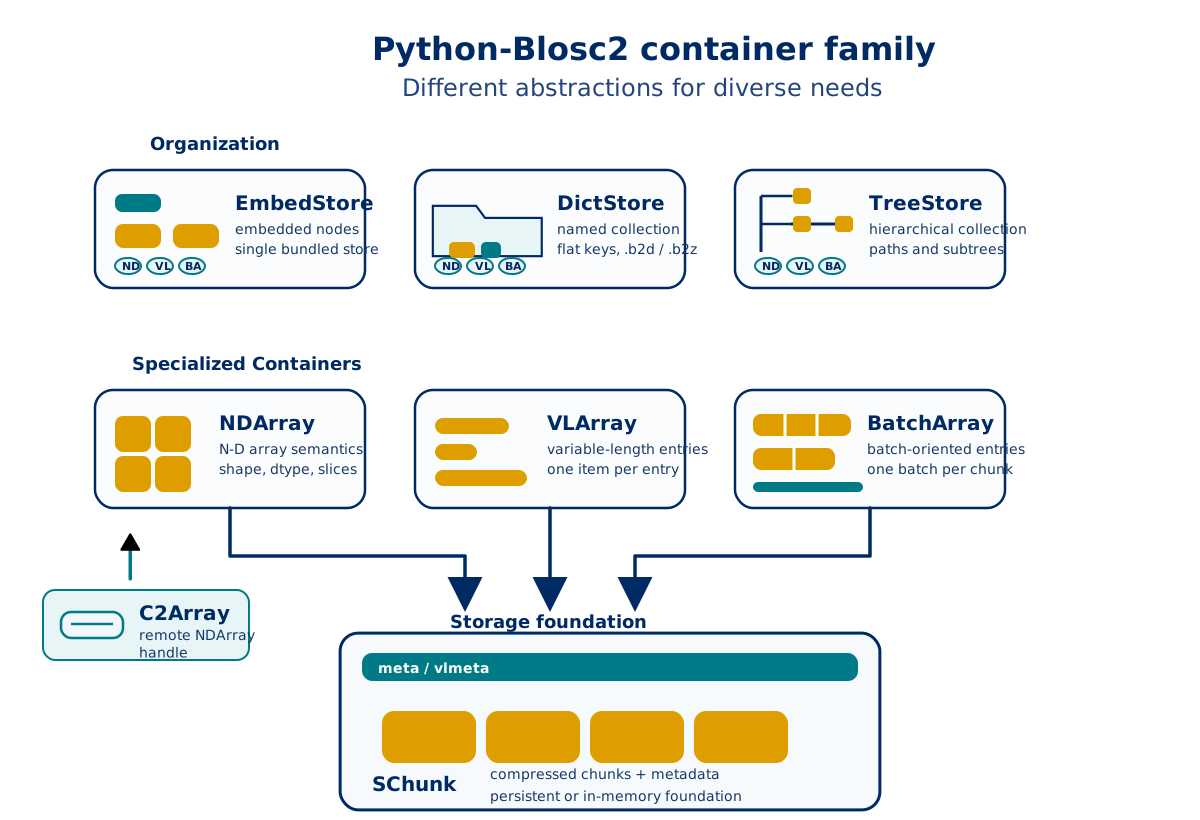
For more info on each of these containers, keep reading.
SChunk: The Foundation
SChunk is the low-level compressed storage container in Blosc2. Conceptually, it is a sequence of compressed chunks plus metadata.
Use it when you want direct control over chunk-oriented storage, chunk append/update operations, or persistent compressed payloads without array semantics.
[2]:
data = np.arange(12, dtype=np.int32)
schunk = blosc2.SChunk(
    chunksize=4 * data.dtype.itemsize,
    data=data,
    cparams=blosc2.CParams(typesize=data.dtype.itemsize),
)

out = np.empty(5, dtype=np.int32)
schunk.get_slice(start=2, stop=7, out=out)
chunk_info = list(schunk.iterchunks_info())

show("nchunks", schunk.nchunks)
show("nbytes", schunk.nbytes)
show("slice [2:7]", out)
show("chunk ratios", [round(float(info.cratio), 3) for info in chunk_info])
show("special flags", [info.special.name for info in chunk_info])
nchunks: 3
nbytes: 48
slice [2:7]: [2 3 4 5 6]
chunk ratios: [0.333, 0.333, 0.333]
special flags: ['NOT_SPECIAL', 'NOT_SPECIAL', 'NOT_SPECIAL']
NDArray: Compressed N-D Arrays
NDArray is the main dense-array container in python-blosc2. It adds array semantics such as shape, dtype, slicing, chunking, and persistence on top of an underlying SChunk.
Use it for dense numeric data when you want array operations together with compressed storage.
[3]:
arr_path = reset("demo_array.b2nd")
a = blosc2.asarray(
    np.arange(12).reshape(3, 4),
    urlpath=arr_path,
    mode="w",
    chunks=(2, 2),
    blocks=(1, 2),
)
reopened = blosc2.open(arr_path, mode="r")

show("shape", a.shape)
show("chunks", a.chunks)
show("blocks", a.blocks)
show("slice [:, 1:3]", a[:, 1:3])
show("reopened type", type(reopened).__name__)
shape: (3, 4)
chunks: (2, 2)
blocks: (1, 2)
slice [:, 1:3]: [[ 1  2]
 [ 5  6]
 [ 9 10]]
reopened type: NDArray
ObjectArray: Variable-Length Items
ObjectArray is a list-like container for variable-length Python values. Each entry is serialized and stored as its own compressed chunk in a backing SChunk.
Use it for ragged or heterogeneous values such as strings, dictionaries, tuples, lists, and byte payloads.
[4]:
vl_path = reset("notes.b2frame")
vla = blosc2.ObjectArray(urlpath=vl_path, mode="w", contiguous=True)
vla.extend(
    [
        {"kind": "alpha", "count": 1},
        ["x", "y"],
        b"abc",
    ]
)
reopened = blosc2.open(vl_path, mode="r")

show("entries", list(vla))
show("entry types", [type(v).__name__ for v in vla])
show("reopened type", type(reopened).__name__)
show("reopened[1]", reopened[1])
entries: [{'kind': 'alpha', 'count': 1}, ['x', 'y'], b'abc']
entry types: ['dict', 'list', 'bytes']
reopened type: ObjectArray
reopened[1]: ['x', 'y']
BatchArray: Batched Variable-Length Data
BatchArray is designed for batch-oriented variable-length data. Instead of storing one item per chunk, it stores one batch per chunk, with optional internal subdivision for more efficient item access inside a batch.
Use it when data arrives or is processed in batches and batch-level append/update operations are the natural API.
[5]:
batch_path = reset("batches.b2b")
store = blosc2.BatchArray(urlpath=batch_path, mode="w", contiguous=True, items_per_block=2)
store.append([{"x": 1}, {"x": 2}, {"x": 3}])
store.append([{"x": 4}, {"x": 5}])
reopened = blosc2.open(batch_path, mode="r")

show("batches", len(store))
show("first batch", list(store[0]))
show("first four items", list(store.iter_items())[:4])
show("reopened type", type(reopened).__name__)
batches: 2
first batch: [{'x': 1}, {'x': 2}, {'x': 3}]
first four items: [{'x': 1}, {'x': 2}, {'x': 3}, {'x': 4}]
reopened type: BatchArray
EmbedStore: Bundle Several Containers Into One Store
EmbedStore is a dictionary-like container that stores several Blosc2 objects as embedded nodes inside one backing store.
Use it when you want to package several arrays or container objects into one portable object or file.
[6]:
embed_path = reset("bundle.b2e")
estore = blosc2.EmbedStore(urlpath=embed_path, mode="w")
estore["/arr"] = np.arange(5)
estore["/ones"] = blosc2.ones(3, dtype=np.int16)

show("keys", sorted(estore.keys()))
show("type(/arr)", type(estore["/arr"]).__name__)
show("/arr", estore["/arr"][:])
show("type(/ones)", type(estore["/ones"]).__name__)
keys: ['/arr', '/ones']
type(/arr): NDArray
/arr: [0 1 2 3 4]
type(/ones): NDArray
DictStore: Key-Value Collection Of Containers
DictStore is a directory- or zip-backed key-value collection for Blosc2 objects.
Use it when you want to organize a dataset made of several named arrays or containers while keeping storage portable.
[7]:
dict_path = reset("dataset.b2z")
with blosc2.DictStore(dict_path, mode="w") as dstore:
    dstore["/raw"] = np.arange(4)
    dstore["/group/grid"] = blosc2.asarray(np.arange(6).reshape(2, 3))
    show("written keys", sorted(dstore.keys()))

with blosc2.DictStore(dict_path, mode="r") as dstore:
    show("reopened type", type(dstore).__name__)
    show("keys", sorted(dstore.keys()))
    show("/group/grid", dstore["/group/grid"][:])
written keys: ['/group/grid', '/raw']
reopened type: DictStore
keys: ['/group/grid', '/raw']
/group/grid: [[0 1 2]
 [3 4 5]]
TreeStore: Hierarchical Datasets
TreeStore extends DictStore with stricter hierarchical semantics and subtree navigation.
Use it when your dataset is naturally tree-structured and you want path-based organization plus subtree-level operations.
[8]:
tree_path = reset("tree.b2z")
with blosc2.TreeStore(tree_path, mode="w") as tstore:
    tstore["/exp/run1/data"] = np.arange(3)
    tstore["/exp/run2/data"] = np.arange(3, 6)
    subtree = tstore.get_subtree("/exp")
    show("subtree keys", sorted(subtree.keys()))
    show("walk(/)", list(subtree.walk("/")))

with blosc2.TreeStore(tree_path, mode="r") as tstore:
    show("reopened type", type(tstore).__name__)
    show("/exp/run2/data", tstore["/exp/run2/data"][:])
subtree keys: ['/run1', '/run1/data', '/run2', '/run2/data']
walk(/): [('/', ['run1', 'run2'], []), ('/run1', [], ['data']), ('/run2', [], ['data'])]
reopened type: TreeStore
/exp/run2/data: [3 4 5]
C2Array: Remote Arrays
C2Array is a remote array handle for Caterva2-hosted arrays. Unlike the local containers above, it does not primarily manage local storage; instead, it exposes remote metadata and remote slice access.
For an offline-safe tutorial, the cell below shows the pattern without performing the network access by default.
[9]:
RUN_REMOTE = False
remote_urlpath = blosc2.URLPath("@public/examples/ds-1d.b2nd", "https://cat2.cloud/demo")

show("remote URLPath", remote_urlpath)
if RUN_REMOTE:
    remote = blosc2.open(remote_urlpath, mode="r")
    show("remote type", type(remote).__name__)
    show("remote slice [:5]", remote[:5])
else:
    print("Set RUN_REMOTE = True to open a live C2Array from a Caterva2 service.")
remote URLPath: <blosc2.c2array.URLPath object at 0x10f0aa660>
Set RUN_REMOTE = True to open a live C2Array from a Caterva2 service.
Choosing The Right Container
Container |
Backing idea |
Best for |
|---|---|---|
|
raw compressed chunks |
direct chunk-level storage control |
|
|
dense numeric arrays |
|
one variable-length entry per chunk |
ragged or heterogeneous Python values |
|
one batch per chunk |
batch-oriented ingestion and access |
|
one bundled object store |
packaging a few Blosc2 objects together |
|
keyed collection of leaves |
portable multi-object datasets |
|
hierarchical keyed collection |
tree-structured datasets |
|
remote array handle |
arrays hosted by a remote Caterva2 service |
A simple rule of thumb is:
start with
NDArrayfor dense numeric datadrop down to
SChunkif you need chunk-level controluse
ObjectArrayorBatchArrayfor variable-length Python objectsuse
EmbedStore,DictStore, orTreeStorewhen your dataset contains multiple objects
Final Notes
This notebook is intentionally organized from low-level storage to higher-level organization:
understand
SChunkfirstuse
NDArrayfor most dense numeric workloadsmove to
ObjectArrayorBatchArraywhen entries stop being fixed-size arraysuse
EmbedStore,DictStore, orTreeStorewhen you need to package multiple objects togetheruse
C2Arraywhen the data lives on a remote service
For deeper details on a specific class, continue with the reference docs and the dedicated tutorials for ObjectArray, BatchArray, and indexing.
[10]:
# Cleanup for repeated local runs of this notebook.
shutil.rmtree(WORKDIR)
show("removed workdir", WORKDIR)
removed workdir: /var/folders/r3/bycghmsx079bmglqt_2xmlt00000gn/T/blosc2-containers-iv9daz3u